Software Pile develops on the Niagara Framework® for systems integrators, OEMs, and facility teams — led by a Tridium-certified Niagara Full Stack Developer holding Niagara Certified Professional Developer (NCPD) credentials in both Drivers and User Interface, plus Niagara 4 Developer certification. Credential verification is available on request.
Niagara N4 Module Development
Custom N4 modules built against your station architecture and Niagara version: control logic, data processing, custom components, engineering tools, and packaged modules with signing and compatibility testing as part of delivery.
Custom Driver Development
Drivers for proprietary and OEM equipment when an off-the-shelf driver does not exist: protocol analysis, Baja API driver architecture, point discovery, histories, alarms, and validation against real hardware. We also extend and repair existing drivers.
Workbench Tools & Engineering Utilities
Workbench extensions that speed up engineering: bulk tagging and edits, station audits, deployment checklists, and custom views your technicians actually use.
Supervisor Applications & Dashboards
Niagara Supervisor integrations, HTML5 and Hx dashboards, BajaScript interfaces, and BQL-driven reporting: histories, alarms, energy views, and role-based operator screens.
Protocol & Systems Integration
BACnet, Modbus, MQTT, SNMP, and oBIX integrations; Project Haystack tagging; REST connections to CMMS, ERP, and cloud platforms — so building data reaches the systems where decisions happen.
AX-to-N4 Migration
Structured migration from Niagara AX to N4: station assessment, module compatibility review, PX-to-HTML5 modernization, phased cutover planning, and validation — without losing histories or alarm continuity.
How We Work
Every engagement starts with your station architecture, Niagara version, host IDs, and target hardware. We deliver signed, compatibility-tested modules with documentation, and we support remote and hybrid delivery across the United States and internationally, with onsite commissioning arranged as required.
Tell us about your Niagara project — include your Niagara version and whether the target is a Supervisor or JACE, and we will scope it accurately from the first call.
Related services
- Niagara Migration Services (AX to N4) — Moving stations off Niagara AX? See our AX-to-N4 migration services.
- Custom Niagara Module and Driver Development — Need functionality Niagara does not ship with? See custom module and driver development.
- Building Automation Integration Services — Connecting mixed-vendor equipment? See BAS integration services.
- Niagara Graphics and Operator Dashboards — Operators struggling with the interface? See Niagara graphics and dashboards.
When Custom Development Is the Right Answer, and When It Is Not
A request that arrives as "we need a custom module" often does not need one. Niagara ships a large amount of function that is reachable through configuration: point extensions, control logic assembled from components already in the palette, tagging, and the standard drivers already in the framework. If the behavior you want can be built from what is already there, that is the cheaper path and the one that survives version upgrades with the least work.
The cases where development is the honest answer are narrower and recognizable. There is no driver for the equipment and the vendor will not supply one. The logic you need cannot be expressed on a wiresheet without becoming unmaintainable. You are an OEM and need your product to appear in Niagara as a real device rather than a set of hand-mapped points. An engineering task has to be repeated across many stations and doing it by hand is the actual cost. Or an operator view is required that no combination of shipped widgets produces.
Custom development earns its place in a narrower set of cases than the phrase suggests, and being told you do not need it is a legitimate outcome of a scoping call. If a configuration route exists, it is worth saying so before code is written, because every custom module becomes something that has to be carried forward across future Niagara releases. The first question to answer is whether the gap is in the framework or in the way the station is currently engineered.
What the Work Depends On From Your Side
Scoping collects the station details. What it cannot collect is the list below, and these are the items that decide whether a build runs to plan or stalls in the middle.
- Access to the equipment, or to a unit of the same model and firmware. A driver is only proven once it has talked to the device it was written for, and a unit that exists only on a drawing cannot be talked to. If the equipment is reachable only during a plant shutdown, that constrains the schedule more than the development does.
- Protocol documentation, or a device we are allowed to observe. Register maps, object lists, command sets, and error behavior. Where documentation does not exist, behavior has to be inferred from traffic, which is slower and leaves edge cases that surface later rather than never.
- Someone on your side who can answer engineering questions and confirm the finished point list. Point lists change during a build, and a decision maker who is unreachable turns a small question into an open item that blocks acceptance.
- Your point naming and tagging convention, if you have one. If you do not, it is better to settle on one before the driver names points, because renaming afterward means touching graphics, histories, and alarm links.
- A decision on how the driver should behave when a device stops answering. Stale values, alarm behavior, retry handling, and what the operator sees are engineering choices about your site, not defaults that should be picked for you.
Where a Module Lives, and What That Means for Deployment
A Niagara module is not an application that sits next to the station. It is a JAR placed in the Niagara installation on the host and loaded by the station when the station starts, which makes installing or updating one a host operation followed by a station restart rather than a change you make while the station runs. On a JACE that restart is a window that has to be planned around the equipment it controls. On a Supervisor it is usually easier to schedule, but it still interrupts whatever is polling and logging at that moment.
The second thing that surprises people is that a module can have more than one side. Station-side code runs on the host. Workbench-side and browser-side parts have to be present wherever engineering or operator screens are opened, so "it works on my laptop" is usually a distribution problem rather than a code problem. Signing does not make a module portable; it only makes an unmodified module installable, and the module still has to match the Niagara version and the host it is going onto.
Version upgrades are a scheduled event, not an automatic one, so a custom module belongs on the same upgrade plan as the station rather than being discovered during the cutover.
What Actually Delays Integration Projects
Integration projects that run long usually do not run long because of the protocol. The protocol is the known part. What extends a schedule is normally a condition in the existing installation that was not visible when the work was scoped.
Station load is one. A JACE already near its limits on points, histories, or engine cycle time will not quietly absorb a new driver and a new point population, and the honest answer in that situation is sometimes a second host, or moving histories to a Supervisor, rather than a more efficient driver. Access is another. Reaching an operational building network involves your IT group, and that approval sits outside the engineering work entirely. Device population is a third. A site described as one equipment type frequently contains several firmware revisions that answer differently, and the driver has to handle the ones actually installed rather than the ones on the submittal.
This is why the questions asked at scoping are about the installed condition of the site rather than the feature list, and why the build runs against a copy of the station rather than the live one wherever the work allows.
Frequently Asked Questions
What is Niagara development here, concretely, and what is not included?
It is software written to run inside a Niagara station or alongside it, for an OEM, an integrator, or an in-house facility team. The distinction that matters most is between development and configuration: if Niagara already ships a driver for your equipment, getting it working is engineering and configuration, and it should be scoped that way rather than as a build. Development is what happens when the function does not exist in the framework at all, or exists only in a form that cannot be maintained. It is not hardware supply, not Niagara licensing, and not the mechanical startup and balancing of the HVAC equipment itself, which stays with the mechanical contractor.
What has to already exist before development can start?
A Niagara station and the host it runs on, at a known version, plus credentials that allow software to be installed on that host rather than station login alone. Licensing matters as well, since what a station is licensed for affects what can be added to it, and confirming that during scoping is cheaper than discovering it at install. We also need a station to develop against, which does not have to be the production one. If the station is still on AX, the version question comes before everything else, because a module written for N4 is not an AX module.
How does a project actually proceed, in order?
Scoping against the station comes first: version, host, what already exists, and what the module has to do. Then protocol or interface analysis, from documentation where it exists and from observed traffic where it does not. Then development and bench work away from your production station, followed by validation against the actual device or an equivalent unit. Installation on the target host and point mapping come last, because each stage produces the input the next one needs, and pulling the install date forward past validation moves the problem to the site.
How is a driver proven before it goes on a live station?
On a bench, against the device itself or a unit of the same model and firmware, before anything touches a production host. What gets checked is more than whether points read: discovery has to produce the right point population, values have to survive a device restart, histories and alarms have to behave the way they were configured, and the driver has to fail the way you decided it should when communications drop. Simulators are useful early but they are not proof, because they answer the way the specification says rather than the way the equipment does.
How does this integrate with the systems we already run?
The effort is mostly direction and mapping, not protocol. Whether data is pushed out of the station or polled into it drives the firewall and network requirements, and that decision usually belongs to your IT group rather than the BAS side, since an outbound connection from the station is generally easier to get approved than an inbound one to it. Once transport is settled, the work concentrates on mapping and tagging, because a receiving system has to know that a point is a discharge air temperature on a specific unit and not just a unique string. Where points are not named or tagged consistently, that cleanup is the integration project and the connection itself is the small part.
What happens to our station data, and what stays under our control?
The station, its data, and its credentials stay yours. What we normally work from is a station backup, a copy you take and share deliberately rather than open access to the production station; it carries your point names, configuration, and often history data, so its scope is worth agreeing before it is sent. Where access to a live station is needed, it goes through whatever remote access method your IT group already uses, on accounts you create and can revoke. Nothing about the work requires your station to reach an outside service unless you specifically ask for an outbound integration.
What do we have to decide before you start?
Whether the module is for one site or is meant to be reused across your stations. A module written for a single station can assume that station's naming, point structure, and equipment mix, which makes it smaller and quicker to build. A module you intend to reuse, or to ship with your product as an OEM, has to be parameterized, has to tolerate configurations it was not written against, and needs versioning and packaging discipline the single-site version would not need. Retrofitting reuse into a single-site module is usually more work than building for reuse from the start, so the question is worth answering early even when the first deployment is one building.
What happens to a custom module when we upgrade Niagara or replace hardware?
Custom modules do not carry forward on their own. Each one is recompiled against the new Niagara release, re-signed, and retested, because framework APIs change between major versions and a module built for one is not guaranteed to load on the next. The safe sequence is to prove the module on the target version in a test station first and move the production station second. Replacing hardware raises a separate question, because Niagara licensing is tied to host identity: a new JACE or Supervisor means new host IDs and license handling, which is a licensing task that runs alongside the module work rather than being part of it.
Recorded Demonstrations
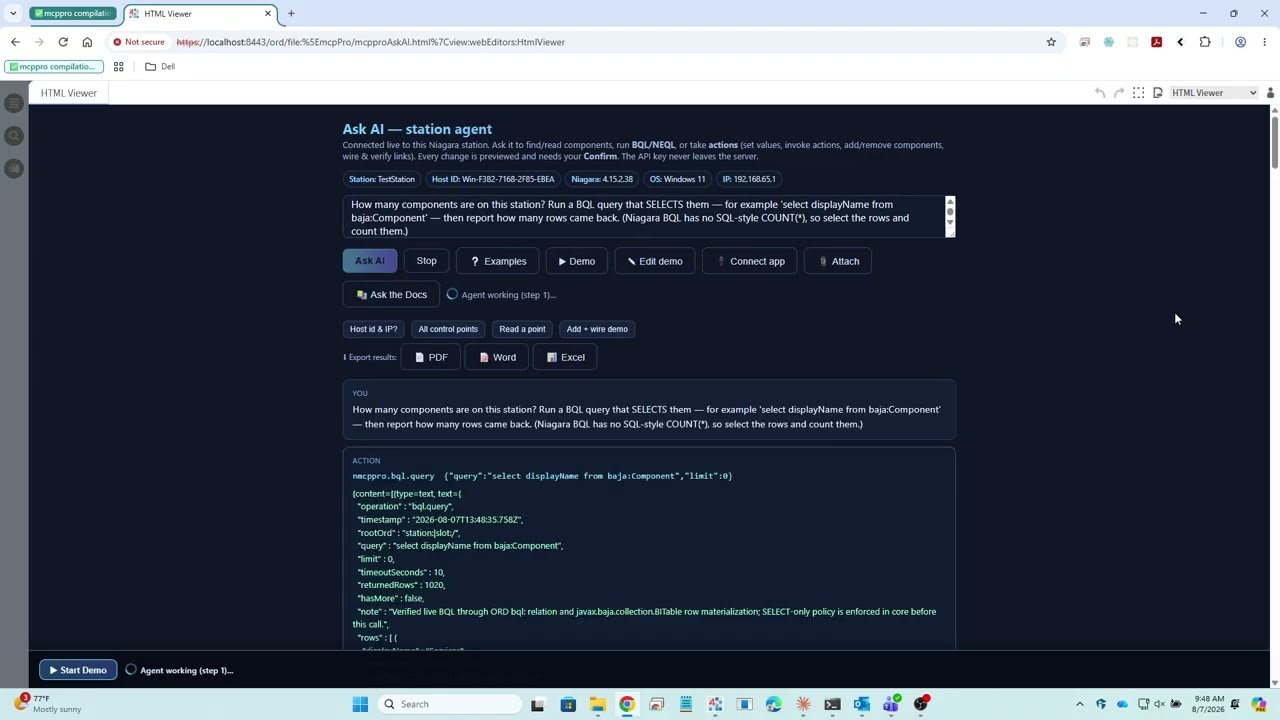
A recorded session showing a Niagara N4 station being operated, engineered and supervised through natural language.